Has anyone managed to get customers’ internet-services traffic between certain dates?
Requesting each internet-service’s traffic by a single day then totalling them works but it generates thousands of API calls and is painfully slow.
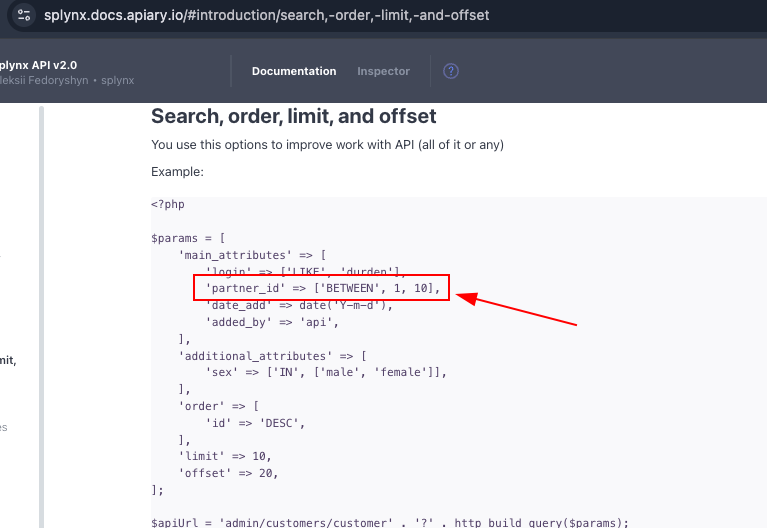
Looking at the splynx documentation, it gives an example of the BETWEEN operator on the date_add parameter
I’ve tried using this but it just gives returns an “invalid attribute: date_add”.
Changing it the parameter to date is accepted but it just ignores the BETWEEN operator and returns ALL the data for that particular internet service_ID. I can then check against the date for each returned element. Whilst this is currently faster, I’m concerned that as our data set grows, the amount of returned data will be massive and it’ll be incredibly slow.
                            $totalUploadBytes = 0;
                            $totalDownloadBytes = 0;

                            // Use the singular endpoint with the BETWEEN filter for a single, optimized API call
                            $trafficParams = [
                                'main_attributes' => [
                                    'service_id' => $service['id'],
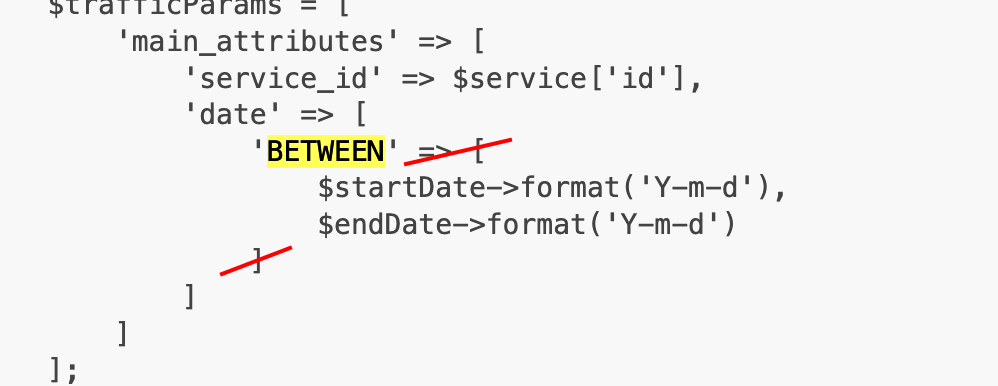
                                    'date' => [
                                        'BETWEEN' => [
                                            $startDate->format('Y-m-d'),
                                            $endDate->format('Y-m-d')
                                        ]
                                    ]
                                ]
                            ];
                            $trafficCounters = $splynx->get('admin/customers/customer-traffic-counter', $trafficParams);

                            if ($trafficCounters !== null && !empty($trafficCounters)) {
                            // To bypass the API's date filtering issues,
                            // for the service and then manually filter it.
                                foreach ($trafficCounters as $counter) {
                                    $counterDate = new DateTime($counter['date']);
                                    if ($counterDate >= $startDate && $counterDate <= $endDate) {
                                       $totalUploadBytes += $counter['up'] ?? 0;
                                       $totalDownloadBytes += $counter['down'] ?? 0;
                                    }
                                }
                            }
Get function in the created object.
public function get($path, $params = [])
    {
        $queryString = '';

        // Custom logic to handle the BETWEEN filter for the traffic counter endpoint
        if (isset($params['main_attributes']['date']['BETWEEN'])) {
            $dates = $params['main_attributes']['date']['BETWEEN'];
            unset($params['main_attributes']['date']); // Unset the complex array

            // Manually build the query string for the BETWEEN filter
            $filterString = sprintf(
                'filter[attribute]=date&filter[operator]=BETWEEN&filter[value][0]=%s&filter[value][1]=%s',
                urlencode($dates[0]),
                urlencode($dates[1])
            );

            // Build the rest of the query string as normal
            $remainingParams = http_build_query($params);
            $queryString = $filterString . '&' . $remainingParams;

        } else {
            $queryString = http_build_query($params);
        }

        $fullUrl = $this->apiUrl . '/' . ltrim($path, '/') . ($queryString ? '?' . $queryString : '');

        // Construct the Basic Authentication header
        $authHeader = 'Basic ' . base64_encode($this->apiKey . ':' . $this->apiSecret);

        $ch = curl_init($fullUrl);
        curl_setopt($ch, CURLOPT_RETURNTRANSFER, true);
        curl_setopt($ch, CURLOPT_HTTPHEADER, [
            'Authorization: ' . $authHeader,
            'Accept: application/json'
        ]);
        curl_setopt($ch, CURLOPT_USERAGENT, 'Splynx-API-Client');

        $response = curl_exec($ch);
        $httpCode = curl_getinfo($ch, CURLINFO_HTTP_CODE);
        curl_close($ch);

        if ($httpCode === 200) {
            return json_decode($response, true);
        } else if ($httpCode === 404 && strpos($path, 'customer-traffic-counter') !== false) {
            // Special case for the traffic counter endpoint, which returns 404 when no data is found.
            // We want to handle this gracefully by returning an empty array.
            return [];
        } else {
            // Echoing errors for CLI output for all other non-200 responses
            echo "API GET request to {$fullUrl} failed with HTTP code {$httpCode}: " . ($response ?: 'No response body') . "\n";
            return null;
        }
    }